PS5 VR, le site jeux vidéo dédié à la PS5 et le PSVR de Sony. Tests de jeux PS5, date de sortie, manette dual sense, pré-commande, rétro compatibilité, design, PSVR2… Retrouvez toute l'actualité de la PS5, PS4, PSVR et PSVita. PS5 VR c'est aussi le top des meilleurs jeux PS5 et des meilleurs jeux PS4. Mais aussi du retro gaming, des geekeries hi tech, des tests, et des reviews.
Vous ne rêvez pas ! Il est désormais possible, si vous possédez une switch hackée / Jailbreakée avec un custom firmware tel que Atmosphere d’émuler la Sega Saturn de manière 100% fonctionnelle !
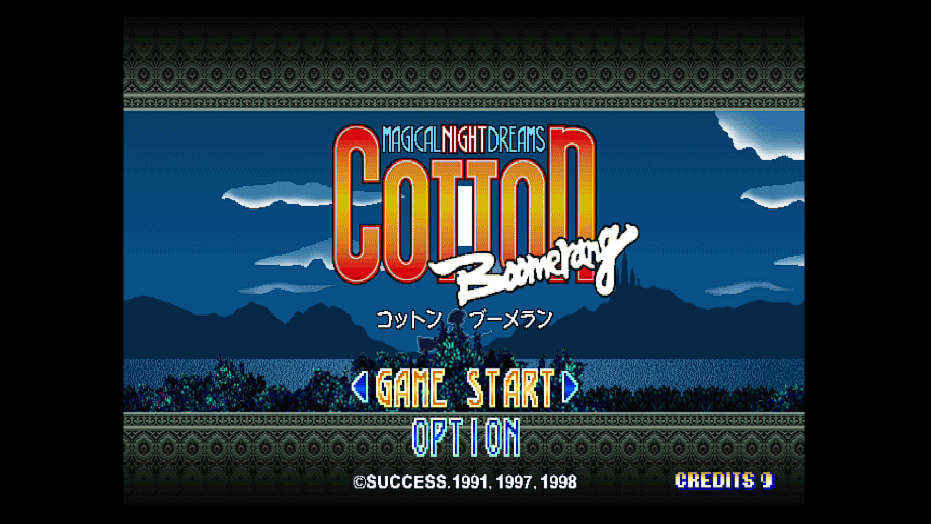
Le hack a été découvert par un membre de GBATemp , il a constaté que les 3 jeux du Cotton Guardian Force Saturn Tribute sorti sur Nintendo Switch sont gérés par un émulateur Sega Saturn actuellement inconnu. En outre, les 3 versions autonomes de « Cotton Boomerang », « Cotton 2 » et « Guardian Force » utilisent également cet émulateur. Il s’agit donc d’un émulateur utilisé créé par un éditeur officiel et partenaire de nintendo pour porter leur jeux Sega Saturn sur Switch.
Vous devez posséder les originaux !
Petit préambule tout de même, vous ne détenez pas les droits sur ces jeux ! Avant de télécharger des jeux Saturn sachez vous devez posséder les originaux, ce qui est toléré dans le cadre de la copie privée. Dans le cas contraire c’est du piratage est vous êtes dans l’illégalité.
Procédure pour lancer une jeu Saturn sur Switch :
Il est très simple d’injecter un jeu Saturn de remplacement si votre Nintendo Switch utilise un CFW, il suffit de suivre les instructions dans le fil de gbatemp. Voici la procédure décrite sur le forum :
Quick instructions for injection
Create a directory for the title of your game in atmosphere/contents Replace bin and cue files Rename your cue file based on game – see below for reference, do not rename bin files For other tweaks, see « Important posts » play.
Install one of the games. Either the Triple Collection or each game as a standalone depending on where you « get » the game
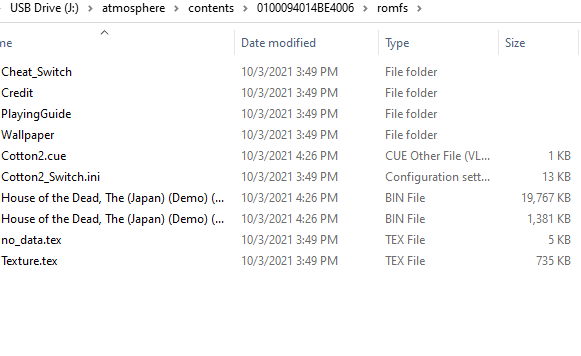
Create a Title Id folder of your chosen game and place in your « Contents » folder for atmosphere or « Titles » folder for SXOS. 0100094014BE4006 for Collection 010077001526E002 for Boomerang standalone 0100A18015268002 for Cotton 2 standalone Place a « romfs » folder inside the title ID folder Place your Saturn roms in romfs folder in .bin format Rename the .cue file for your saturn roms to either Cotton2.cue for the collection/Cotton 2 standalone or CottonBoomerang.cue for Boomerang Standalone (Sometimes you have to reboot your switch for changes to take effect) Launch game.
Pour résumer en français ça donne :
Instructions rapides pour l’injection
Créer un dossier au nom du jeu dans atmosphere/contents.
Remplacer les fichiers .bin et .cue du jeu.
Ne renommez pas les fichiers .bin.
Renommez uniquement le fichier .cue selon le jeu (voir ci-dessous).
Pour d’autres ajustements, consulter les « Important posts ».
Installer le jeu :
Soit la Triple Collection
Soit chaque jeu individuellement, selon la version obtenue.
Créer un dossier Title ID correspondant au jeu choisi :
0100094014BE4006 → Collection
010077001526E002 → Cotton Boomerang (standalone)
0100A18015268002 → Cotton 2 (standalone)
Placer ce dossier :
Dans atmosphere/Contents (Atmosphere)
Ou dans Titles (SXOS)
À l’intérieur du dossier Title ID, créer un dossier romfs.
Placer les ROMs Saturn dans romfs au format .bin.
Renommer le fichier .cue :
Cotton2.cue → Collection ou Cotton 2 standalone
CottonBoomerang.cue → Boomerang standalone
Redémarrer la Switch si les changements ne s’appliquent pas immédiatement.
Lancer le jeu.
Liste des jeux Saturn compatibles avec l’émulateur SWITCH
A noter que cette liste et non exhaustive et a été testé en mode portable sans overclock.
Albert Odyssey: Legend of Eldean (USA) (RE) – Perfect
Amok – Perfect
Astal (USA) – Perfect
Baku Baku Animal (USA) – Almost Perfect (Minor lag, consistently running ~50fps)
Burning Rangers (USA) – Almost Perfect (Minor lag at times, I was able to complete the tutorial no problem)
Bug! (USA) – Perfect
Bug Too! (USA) – Perfect
Bulk Slash (Japan) – Unplayable (Game hangs on black screen after start screen)
Clockwork Knight (USA) – Perfect
Clockwork Knight 2 (USA) – Unplayable (Crashes after main menu; use PAL version)
Clockwork Knight 2 (PAL) – Perfect
Clockwork Knight: Pepperouchau no Fukubukuro (Japan) – CK1 Perfect / CK2 Unplayable (Crash; Use PAL Standalone)
Dark Savior – Perfect
Die Hard Arcade (USA) – Perfect
Dragon Force (USA) – Perfect
Dungeons & Dragons: Shadows Over Mystara (Japan) – Perfect
Elevator Action Returns (Japan) – Perfect
Gebockers (Japan) – Perfect
Guardian Heroes (USA) – Perfect
Gungriffon (USA) – Perfect
Keio Flying Squadron 2 (Europe) – Perfect
Legend of Oasis (USA) – Perfect
Linkle Liver Story (Japan) (English Translation) – Perfect
Loaded (USA) – Perfect
Magic Knight Rayearth (USA) – Perfect
Metal Slug – Super Vehicle-001 (Japan) (Rev A) – Perfect
Mr. Bones (USA) / Mr. Bones (Japan) – Unplayable (Both regions, game hangs on black screen and never proceeds)
Night Striker S (Japan) – Perfect
NiGHTS into Dreams… (USA) (RE) – Almost Perfect (Often there is a very minor frame drop, but the only reason I even noticed is due to the audio. Otherwise, you can’t even tell.)
Noon (Japan) (Rev A) – Perfect
Panzer Dragoon (USA) – Perfect
Panzer Dragoon Zwei (USA) – Perfect
Panzer Dragoon Saga (USA) (Disc 1) – Almost Perfect (Minor audio cracks at random times, I was able to play on foot & riding on the dragon without issue)
Policenauts (Japan) (English Translation) – Perfect (Emulator will not read ISO+WAV+CUE, you will need to convert to BIN+CUE. I recommend AnyBurn to accomplish this.)
Powerslave (USA) – Perfect
Radiant Silvergun (Japan) – Perfect
Rayman (USA) / Rayman (Japan) – Unplayable (Both regions have an input bug. Both in the main menu & in-game, when you press a directional key (Joystick or D-Pad, both are effected), the game responds to the input VERY rapidly, even with a very light press. It ultimately makes the game unplayable)
Sakura Wars (Japan) (English Translation) – Perfect (Emulator will not read ISO+WAV+CUE, you will need to convert to BIN+CUE. I recommend AnyBurn to accomplish this.)
Sega Ages: Power Drift – Almost Perfect (Minor Graphical issues: vehicle disappears when you’re on/under a bridge)
Saturn Bomberman (USA) – Perfect
Shinrei Jusatsushi Taroumaru (Japan) – Perfect
Sonic 3D Blast (USA) – Perfect
Sonic Jam (USA) – Unplayable (Crashes at « Press Start » screen)
Sonic R (USA) – Almost Perfect (Minor audio cracks at random times, I was able to finish a race with no issues.)
Steamgear Mash (Japan) – Perfect
Three Dirty Dwarves (USA) – Unplayable (Have to button mash Start+C to get past main menu, game crashes when the stage is 99% loaded)
Virtua Fighter 2 (USA) (RE) – Somewhat Playable (The game has a consistent amount of slowdown it seems, I would say it’s in the 40-50fps range if I had to guess)
Virtual On: Cyber Troopers (USA) – Perfect? (For some reason the game initially makes you confirm 2 controllers before the start screen. However you can progress as normal in single player after this. No other issues)
Pour offrir les meilleures expériences, nous utilisons des technologies telles que les cookies pour stocker et/ou accéder aux informations des appareils. Le fait de consentir à ces technologies nous permettra de traiter des données telles que le comportement de navigation ou les ID uniques sur ce site. Le fait de ne pas consentir ou de retirer son consentement peut avoir un effet négatif sur certaines caractéristiques et fonctions.
Fonctionnel
Toujours activé
Le stockage ou l’accès technique est strictement nécessaire dans la finalité d’intérêt légitime de permettre l’utilisation d’un service spécifique explicitement demandé par l’abonné ou l’internaute, ou dans le seul but d’effectuer la transmission d’une communication sur un réseau de communications électroniques.
Préférences
L’accès ou le stockage technique est nécessaire dans la finalité d’intérêt légitime de stocker des préférences qui ne sont pas demandées par l’abonné ou l’internaute.
Statistiques
Le stockage ou l’accès technique qui est utilisé exclusivement à des fins statistiques.Le stockage ou l’accès technique qui est utilisé exclusivement dans des finalités statistiques anonymes. En l’absence d’une assignation à comparaître, d’une conformité volontaire de la part de votre fournisseur d’accès à internet ou d’enregistrements supplémentaires provenant d’une tierce partie, les informations stockées ou extraites à cette seule fin ne peuvent généralement pas être utilisées pour vous identifier.
Marketing
Le stockage ou l’accès technique est nécessaire pour créer des profils d’internautes afin d’envoyer des publicités, ou pour suivre l’internaute sur un site web ou sur plusieurs sites web ayant des finalités marketing similaires.